
Yamaha YZF-R125 Service Manual: Removing the fuel tank
1. Extract the fuel in the fuel tank through the fuel tank filler hole with a pump.
2. Remove:
- Fuel hose connector cover "1"
3. Disconnect:
- Fuel hose "2"
CAUTION:
|
NOTE:
Before removing the hose, place a few rags in the area under where it will be removed.
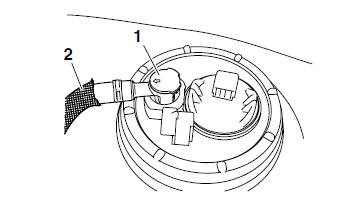
4. Remove:
- Fuel tank
Checking the fuel pump body
1. Check:
Fuel pump body
Obstruction  Clean.
Cracks/damage Replace the fuel tank.
 Fuel tank
...
 Installing the fuel hose
1. Install:
Fuel hose
Fuel hose connector cover
CAUTION:When installing the fuel hose, make sure
that
it is securely connected, and that the fuel
hose connector cover is in t ...
Other materials:
Checking the crankshaft
1. Measure:
Crankshaft runout
Out of specification Replace
the crankshaft,
bearing or both.
NOTE:
Turn the crankshaft slowly.
2. Measure:
Big end side clearance
Out of specification Replace
the crankshaft.
3. Measure:
Crankshaft width
Out of specification&nbs ...
Installing the front brake caliper
1. Install:
Brake caliper "1"
(temporarily)
Copper washers "2"
Brake hose "3"
Brake hose union bolt "4"
WARNINGProper brake hose routing is essential to
insure
safe vehicle operation. Refer to "CABLE
ROUTING" on page 2-33.
CAUTION:
Install the brake ...
Checking the rear brake hose
1. Check:
Brake hoses "1"
Cracks/damage/wear
Replace.
2. Check:
Brake hose holder "2"
Loose connection Tighten the
holder bolt.
Loose or open holder Fasten
properly.
3. Hold the vehicle upright and apply the rear
brake several times.
4. Check:
Brake ho ...