
Yamaha YZF-R125 Service Manual: Adjusting the rear disc brake
1. Check:
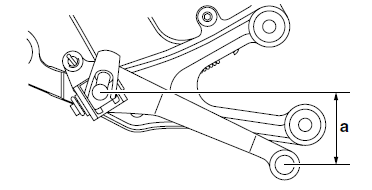
- Brake pedal position
(distance "a" from the center of the rider footrest
to the center of the brake pedal)
Out of specification
 Adjust.
2. Adjust:
- Brake pedal position
a. Loosen the locknut "1".
b. Remove the cotter pin "2", washer "3", and pin "4".
c. Turn the adjusting nut "5" in direction "a" or "b"
until the specified brake pedal position is obtained.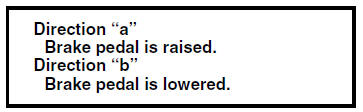
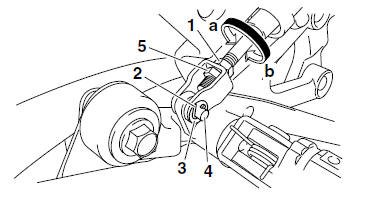
d. Tighten the locknut "1" to specification.
| WARNING A soft or spongy feeling in the brake pedal can indicate the presence of air in the brake system. Before the vehicle is operated, the air must be removed by bleeding the brake system. Air in the brake system will considerably reduce braking performance. |
| CAUTION: After adjusting the brake pedal position, make sure there is no brake drag. |
e. Install the pin, washer, and cotter pin.
| WARNING Always use a new cotter pin. |
 Chassis
...
 Checking the brake fluid level
1. Stand the vehicle on a level surface.
NOTE:
Place the vehicle on a suitable stand.
Make sure the vehicle is upright.
2. Check:
Brake fluid level
Below the minimum level mark "a" → ...
Other materials:
Checking the primary drive gear
1. Remove:
Primary drive gear
Refer to "BALANCER GEAR" on page 5-53.
2. Check:
Primary drive gear
Damage/wear Replace the
primary drive
gear and clutch housing as a set.
Excessive noise during operation
Replace
the primary drive gear and clutch housing as
a set
...
Checking the front brake disc
1. Remove:
Front wheel
Refer to "FRONT WHEEL" on page 4-6.
2. Check:
Brake disc
Damage/galling Replace.
3. Measure:
Brake disc deflection
Out of specification Correct the
brake disc
deflection or replace the brake disc.
a. Place the vehicle on a suitable stand ...
Removing the swingarm
1. Stand the vehicle on a level surface.
WARNINGSecurely support the vehicle
so that there is
no danger of it falling over.
NOTE:
Place the vehicle on a suitable stand so that the
rear wheel is elevated.
2. Measure:
Swingarm side play
Swingarm vertical movement
a. Me ...