
Yamaha YZF-R125 Service Manual: Checking the steering head
1. Wash:
- Bearings
- Bearing races

2. Check:
- Bearings
- Bearing races Damage/pitting →Replace.
3. Replace:
- Bearings
- Bearing races
a. Remove the bearing races from the steering head pipe with a long rod "1" and hammer.
b. Remove the bearing race from the lower bracket with a floor chisel "2" and hammer.
c. Install a new dust seal and new bearing races.
| CAUTION: If the bearing races are not installed properly, the steering head pipe could be damaged. |
NOTE:
- Always replace the bearings and bearing races as a set.
- Whenever the steering head is disassembled, replace the dust seal.
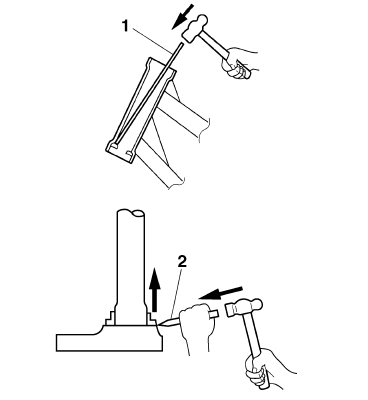
4. Check:
- Upper bracket
- Lower bracket (along with the steering stem) Bends/cracks/damage →Replace.
 Removing the lower bracket
1. Stand the vehicle on a level surface.
WARNINGSecurely support the vehicle so that there
is
no danger of it falling over.
2. Remove:
Upper ring nut
Rubber washer
Lower r ...
 Installing the steering head
1. Lubricate:
Upper bearing
Lower bearing
Bearing races
2. Install:
Lower ring nut
Rubber washer
Upper ring nut
Lock washer
Refer to "CHECKING AND ADJUSTING
THE STEERING HEAD ...
Other materials:
Special tools
The following special tools are necessary for complete and accurate tune-up
and assembly. Use only
the appropriate special tools as this will help prevent damage caused by the use
of inappropriate tools
or improvised techniques. Special tools, part numbers or both may differ
depending on the ...
Assembling the crankcase
1. Thoroughly clean all the gasket mating surfaces
and crankcase mating surfaces.
2. Apply:
Sealant
(onto the crankcase mating surfaces)
NOTE:
Do not allow any sealant to come into contact
with the oil gallery.
3. Install:
Right crankcase
NOTE:
Turn the shift drum segment ...
Checking the spark plug
The spark plug is an important engine
component, which is easy to check.
Since heat and deposits will cause any
spark plug to slowly erode, the spark
plug should be removed and checked
in accordance with the periodic maintenance
and lubrication chart. In addition,
the condition of the ...