
Yamaha YZF-R125 Service Manual: Removing the handlebars
1. Stand the vehicle on a level surface.
| WARNING Securely support the vehicle so that there is no danger of it falling over. |
2. Remove:
- Handlebar grip "1"
NOTE:
Blow compressed air between the handlebar and the handlebar grip, and gradually push the grip off the handlebar.
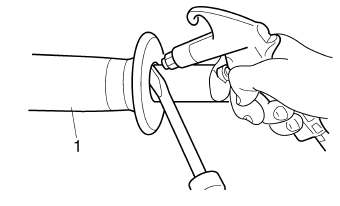
 Handlebars
...
 Checking the handlebars
1. Check:
Left handlebar
Right handlebar
Bends/cracks/damage → Replace.
WARNINGDo not attempt to straighten a bent
handlebar
as this may dangerously weaken it.
...
Other materials:
Special tools
The following special tools are necessary for complete and accurate tune-up
and assembly. Use only
the appropriate special tools as this will help prevent damage caused by the use
of inappropriate tools
or improvised techniques. Special tools, part numbers or both may differ
depending on the ...
Cleaning and lubricating the drive chain
The drive chain must be cleaned and
lubricated at the intervals specified in
the periodic maintenance and lubrication
chart, otherwise it will quickly wear
out, especially when riding in dusty or
wet areas. Service the drive chain as
follows.
NOTICE
The drive chain must be lubricated
...
Parking
When parking, stop the engine, and
then remove the key from the main
switch.
WARNING
Since the engine and exhaust
system can become very hot,
park in a place where pedestrians
or children are not likely to
touch them and be burned.
Do not park on a slope or on soft
ground, ...