
Yamaha YZF-R125 Service Manual: Installing the generator
1. Install:
- Woodruff key
- Generator rotor
- Washer
- Generator rotor nut
NOTE:
- Clean the tapered portion of the crankshaft and the generator rotor hub.
- When installing the generator rotor, make sure the woodruff key is properly sealed in the keyway of the crankshaft.
2. Tighten:
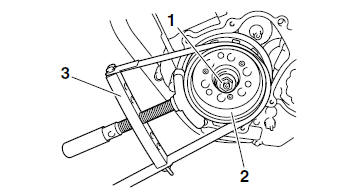
- Generator rotor nut "1"

NOTE:
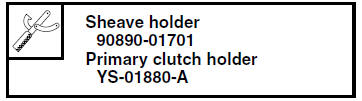
- While holding the generator rotor "2" with the sheave holder "3", tighten the generator rotor nut.
- Do not allow the sheave holder to touch the
projection on the generator rotor.
3. Apply:
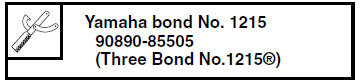
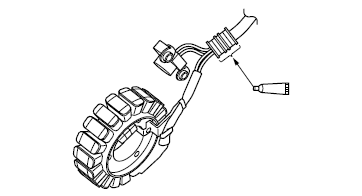
- Sealant
(onto the crankshaft position sensor/stator
assembly lead grommet)
4. Install:
- Generator cover

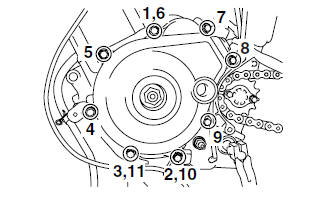
NOTE:
Tighten the generator cover bolts in the proper tightening sequence as shown.
 Installing the starter clutch
1. Install:
Starter clutch assembly
Starter clutch bolts "1"
NOTE:
While holding the generator rotor "2" with the
sheave holder "3", tighten the starter clutch
bolts.
Do not allow t ...
 Electric starter
...
Other materials:
Assembling the front fork legs
The following procedure applies to both of the
front fork legs.
WARNING
Make sure the oil levels in both front fork
legs are equal.
Uneven oil levels can result in poor handling
and a loss of stability.
NOTE:
When assembling the front fork leg, be sure to
rep ...
Checking the front fork
The condition and operation of the front
fork must be checked as follows at the
intervals specified in the periodic maintenance
and lubrication chart.
To check the condition
Check the inner tubes for scratches,
damage and excessive oil leakage.
To check the operation
Place the vehicle ...
Bearings and oil seals
Install bearings "1" and oil seals "2" so that the
manufacturer's marks or numbers are visible.
When installing oil seals "1", lubricate the oil seal
lips with a light coat of lithium-soap-based
grease. Oil bearings liberally when installing, if
appropriate.
CAUTION:Do not spin th ...