
Yamaha YZF-R125 Owners Manual: Fuel tank cap
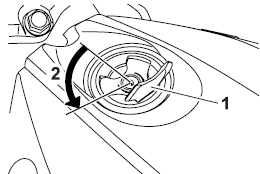
Fuel tank cap
- Fuel tank cap lock cover
- Unlock.
To remove the fuel tank cap
- Open the fuel tank cap lock cover.
- Insert the key into the lock and turn it 1/4 turn counterclockwise. The lock will be released and the fuel tank cap can be removed.
To install the fuel tank cap
- Push the fuel tank cap into position with the key inserted in the lock.
- Turn the key clockwise to the original position, and then remove it.
- Close the lock cover.
TIP
The fuel tank cap cannot be installed
unless the key is in the lock. In addition,
the key cannot be removed if the cap is
not properly installed and locked.
 WARNING
Make sure that the fuel tank cap is
properly installed before riding.
Leaking fuel is a fire hazard.
 Brake pedal
Brake pedal
Brake pedal
The brake pedal is on the right side of
the motorcycle. To apply the rear
brake, press down on the brake pedal. ...
 Fuel
Fuel
Make sure there is sufficient gasoline in
the tank.
WARNING
Gasoline and gasoline vapors are
extremely flammable. To avoid fires
and explosions and to reduce the
risk of injury when refueli ...
Other materials:
Replacing a turn signal light bulb
Remove the turn signal light lens
by removing the screw.
Screw
Remove the burnt-out bulb by
pushing it in and turning it counterclockwise.
Insert a new bulb into the socket,
push it in, and then turn it clockwise
until it stops.
Install the lens by installing ...
Checking the lean angle sensor
1. Remove:
Lean angle sensor
2. Check:
Lean angle sensor output voltage
Out of specification Replace.
a. Connect the lean angle sensor to the wire
harness.
b. Connect the pocket tester (DC 20 V) to the
lean angle sensor coupler as shown.
Positive tester probe
yellow/green "1"
Neg ...
Checking the front fork legs
The following procedure applies to both of the
front fork legs.
1. Check:
Inner tube
Outer tube
Bends/damage/scratches
Replace.
WARNINGDo not attempt to straighten a bent inner
tube as this may dangerously weaken it.
2. Measure:
Spring free length "a"
Out of sp ...