
Yamaha YZF-R125 Owners Manual: Fuel tank cap
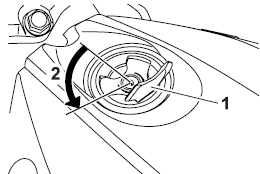
Fuel tank cap
- Fuel tank cap lock cover
- Unlock.
To remove the fuel tank cap
- Open the fuel tank cap lock cover.
- Insert the key into the lock and turn it 1/4 turn counterclockwise. The lock will be released and the fuel tank cap can be removed.
To install the fuel tank cap
- Push the fuel tank cap into position with the key inserted in the lock.
- Turn the key clockwise to the original position, and then remove it.
- Close the lock cover.
TIP
The fuel tank cap cannot be installed
unless the key is in the lock. In addition,
the key cannot be removed if the cap is
not properly installed and locked.
 WARNING
Make sure that the fuel tank cap is
properly installed before riding.
Leaking fuel is a fire hazard.
 Brake pedal
Brake pedal
Brake pedal
The brake pedal is on the right side of
the motorcycle. To apply the rear
brake, press down on the brake pedal. ...
 Fuel
Fuel
Make sure there is sufficient gasoline in
the tank.
WARNING
Gasoline and gasoline vapors are
extremely flammable. To avoid fires
and explosions and to reduce the
risk of injury when refueli ...
Other materials:
Removing the crankshaft
1. Remove:
Crankshaft "1"
NOTE:
Remove the crankshaft with the crankcase
separating tool "2".
Make sure the crankcase separating tool is
centered over the crankshaft.
CAUTION:
To protect the end of the crankshaft, place
an appropriate sized socket between the
c ...
General maintenance and lubrication chart
TIP
The air filter needs more frequent service if you are riding in
unusually wet or dusty areas.
Hydraulic brake service
Regularly check and, if necessary, correct the brake fluid level.
Every two years change the brake fluid.
Replace the brake hoses every four ye ...
Checking and lubricating the cables
The operation of all control cables and
the condition of the cables should be
checked before each ride, and the cables
and cable ends should be lubricated
if necessary. If a cable is damaged
or does not move smoothly, have a
Yamaha dealer check or replace it.
WARNING! Damage to the out ...