
Yamaha YZF-R125 Owners Manual: Brake pedal
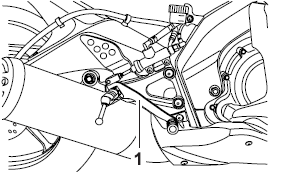
Brake pedal
- Brake pedal
The brake pedal is on the right side of the motorcycle. To apply the rear brake, press down on the brake pedal.
 Brake lever
Brake lever
Brake lever
The brake lever is located at the right
handlebar grip. To apply the front
brake, pull the lever toward the handlebar
grip. ...
 Fuel tank cap
Fuel tank cap
Fuel tank cap lock cover
Unlock.
To remove the fuel tank cap
Open the fuel tank cap lock cover.
Insert the key into the lock and turn
it 1/4 turn counterclockwise. ...
Other materials:
Lubrication diagrams
Clutch push lever
Main axle
Drive axle
Crankshaft
Oil filter
Oil pump assembly
Oil strainer
To cylinder head
Camshaft
Crankshaft
Main axle
Drive axle
...
Fi system
The fuel pump delivers fuel to the fuel injector via the fuel filter. The
pressure regulator maintains the
fuel pressure that is applied to the fuel injector at only 250 kPa (2.50 kg/cm²,
36.3 psi). Accordingly,
when the energizing signal from the ECU energizes the fuel injector, the fuel ...
Checking and lubricating the cables
The operation of all control cables and
the condition of the cables should be
checked before each ride, and the cables
and cable ends should be lubricated
if necessary. If a cable is damaged
or does not move smoothly, have a
Yamaha dealer check or replace it.
WARNING! Damage to the out ...