
Yamaha YZF-R125 Owners Manual: Handlebar switches
Left
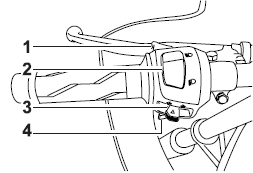
Left
1. Pass switch "PASS"
2. Dimmer switch " /
/ "
"
3. Turn signal switch " /
/ "
"
4. Horn switch" "
"
Right
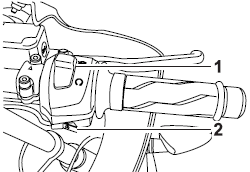
Right
- Engine stop switch "
 /
/ "
" - Start switch"
 "
"
Pass switch "PASS"
Press this switch to flash the headlight.
Dimmer switch "/"
Set this switch to""
for the high
beam and to""
for the low beam.
Turn signal switch "
/"
To signal a right-hand turn, push this
switch to"".
To signal a left-hand
turn, push this switch to"".
When released,
the switch returns to the center
position. To cancel the turn signal
lights, push the switch in after it has returned
to the center position.
Horn switch"
"
Press this switch to sound the horn.
Engine stop switch "/"
Set this switch to"
"
before starting
the engine. Set this switch to"
"
to
stop the engine in case of an emergency,
such as when the vehicle overturns
or when the throttle cable is stuck.
Start switch"
"
Push this switch to crank the engine with the starter. See page 5-1 for starting instructions prior to starting the engine.
 Multi-function display
Multi-function display
Multi-function display
"RESET/SELECT" button
WARNING
Be sure to stop the vehicle before
making any setting changes to the
multi-function display. Changing
s ...
 Clutch lever
Clutch lever
Clutch lever
The clutch lever is located at the left
handlebar grip. To disengage the
clutch, pull the lever toward the handlebar
grip. To engage the clutch, release
th ...
Other materials:
Installing the front brake caliper
1. Install:
Brake caliper "1"
(temporarily)
Copper washers "2"
Brake hose "3"
Brake hose union bolt "4"
WARNINGProper brake hose routing is essential to
insure
safe vehicle operation. Refer to "CABLE
ROUTING" on page 2-33.
CAUTION:
Install the brake ...
Checking the cylinder head
1. Eliminate:
Combustion chamber carbon deposits
(with a rounded scraper)
NOTE:
Do not use a sharp instrument to avoid damaging
or scratching:
Spark plug bore threads
Valve seats
2. Check:
Cylinder head
Damage/scratches Replace.
Cylinder head water jacket
Min ...
Checking the fid (fast idle solenoid)
1. Disconnect:
FID (fast idle solenoid) coupler
2. Check:
FID (fast idle solenoid) resistance
a. Disconnect the FID (fast idle solenoid) coupler
from the FID.
b. Connect the pocket tester ( × 10)
to the terminals
of the FID (fast idle solenoid).
Positive tester probe ...